6 Steps Enterprise Architects Take to Enable Business Outcomes

When business leaders set strategic goals—like accelerate growth or reduce service cycle times—they’re often met with complex processes, outdated systems, and data gaps. This is where Enterprise Architecture (EA) steps in—not to lead everything, but to partner with operations, business, and IT to ensure that technology enables the right outcomes.
Let’s break down how EA contributes, approach business leaders can take by partnering with Enterprise Architecture and the technology tools that can help at each step.
This approach combined with decision scorecard to select a particular path forward are critical to align business and technology with help of Enterprise Architecture.
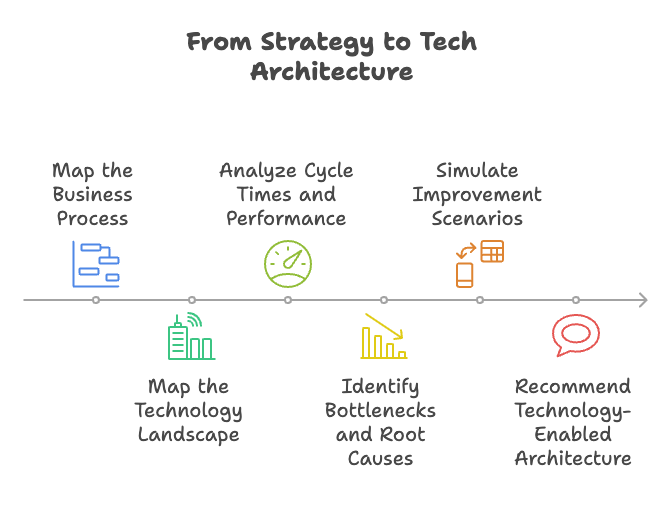
🎯 Step 1: Map the Business Process
Purpose:
Visualize the current workflow to identify where time, handoffs, or manual steps create friction.
Activities:
- Facilitate or support journey mapping workshops
- Document process variants across departments or locations
- Overlay user roles and key decision points
Tools:
- SAP Signavio Process Manager
- ARIS
- Lucidchart or Miro (for early collaboration)
- BPMN or UML for standardized modeling
EA’s Role:
EA supports by standardizing modeling, linking steps to systems, and ensuring alignment to enterprise workflows.
🧩 Step 2: Map the Technology Landscape
Purpose:
Identify systems involved in the current process and highlight integration or data gaps.
Activities:
- Create system-to-process overlays
- Identify manual vs. automated handoffs
- Document integration points (or lack thereof)
Tools:
- LeanIX, Ardoq, or MEGA HOPEX (application portfolio management)
- ServiceNow CMDB or Azure DevOps (for linking infra/data flows)
- Signavio’s Process Insights (for process-to-system traceability)
EA’s Role:
EA validates current state, ensures architecture is well-documented, and evaluates whether systems align with strategic intent.
⏱️ Step 3: Analyze Cycle Times and Performance
Purpose:
Quantify how long the current process takes, where delays occur, and what effort is required to improve the process
Activities:
- Gather process metrics from different systems or manual logs
- Analyze average and variance in processing time
- Track number of manual follow-ups, retries, or rework
Tools:
- Signavio Process Intelligence (process mining)
- Celonis (deep event log analysis)
- Power BI, Qlik, or Tableau (custom performance dashboards)
EA’s Role:
EA supports defining meaningful metrics, validating assumptions, and linking performance breakdowns to architecture or integration issues.
⚠️ Step 4: Identify Bottlenecks and Root Causes
Purpose:
Spot the specific parts of the process and systems that cause delays, friction, or drop-off in process.
Activities:
- Review analytics and process mining outputs
- Interview intake staff and business SMEs
- Correlate system lags with process wait times
Tools:
- Signavio or Celonis (automated bottleneck heatmaps)
- Miro or Confluence (for collaborative cause-effect mapping)
- Jira Align or Smartsheet (to track pain point remediation)
EA’s Role:
EA frames the impact of bottlenecks in terms of business value—e.g., lost orders, delayed care, or increased staff load—and prepares for architectural recommendations.
🧪 Step 5: Simulate Improvement Scenarios
Purpose:
Model what would happen if the bottlenecks were addressed using automation, integration, or new tools.
Activities:
- Run future-state simulations
- Estimate impact on cycle time and staffing
- Model cost-benefit and NPV of new technology
Tools:
- SAP Signavio Process Simulation
- Bizzdesign or iGrafx (for scenario modeling)
- Excel-based NPV templates (to show ROI)
EA’s Role:
EA contributes solution patterns (AI, APIs, orchestration), helps validate feasibility with IT teams, and frames each option’s alignment to business strategy.
💡 Step 6: Recommend Technology-Enabled Architecture
Purpose:
Present a future-state architecture that supports the business goal to improve the process cycle times, increase revenue or improve efficiency.
Activities:
- Propose solution building blocks (e.g., AI , unified experience, improved interoperability)
- Show architecture alignment with enterprise strategy
- Recommend phased delivery and trackable KPIs
Tools:
- LeanIX or Ardoq (to show target architecture)
- Archimate for architectural blueprints
- Portfolio/roadmap tools like Planview, Aha!, or Jira Align
EA’s Role:
EA ensures the solution is scalable, integrates with core systems, and is justified by business value—not just tech novelty.
✅ Final Thoughts: EA as Strategic Partner, Not Owner
Enterprise Architects don’t lead these activities in isolation—but they play a crucial partner role:
- Ensuring traceability between process, system, and strategic value
- Guiding technology recommendations based on enterprise principles
- Supporting simulation and architecture design to make business cases actionable
By using tools like Signavio, LeanIX, and Celonis, EA teams can help organizations go from strategy to scalable solution—faster, with better clarity, and measurable outcomes.
 Tech Canvas